Personal Communication Device Policy for 2026-2027
Posted August 18, 2026
FAQ for Families and Students
Personal Communication Device Policy
Access the FAQ in multiple languages.
What should students do with their personal communication devices?
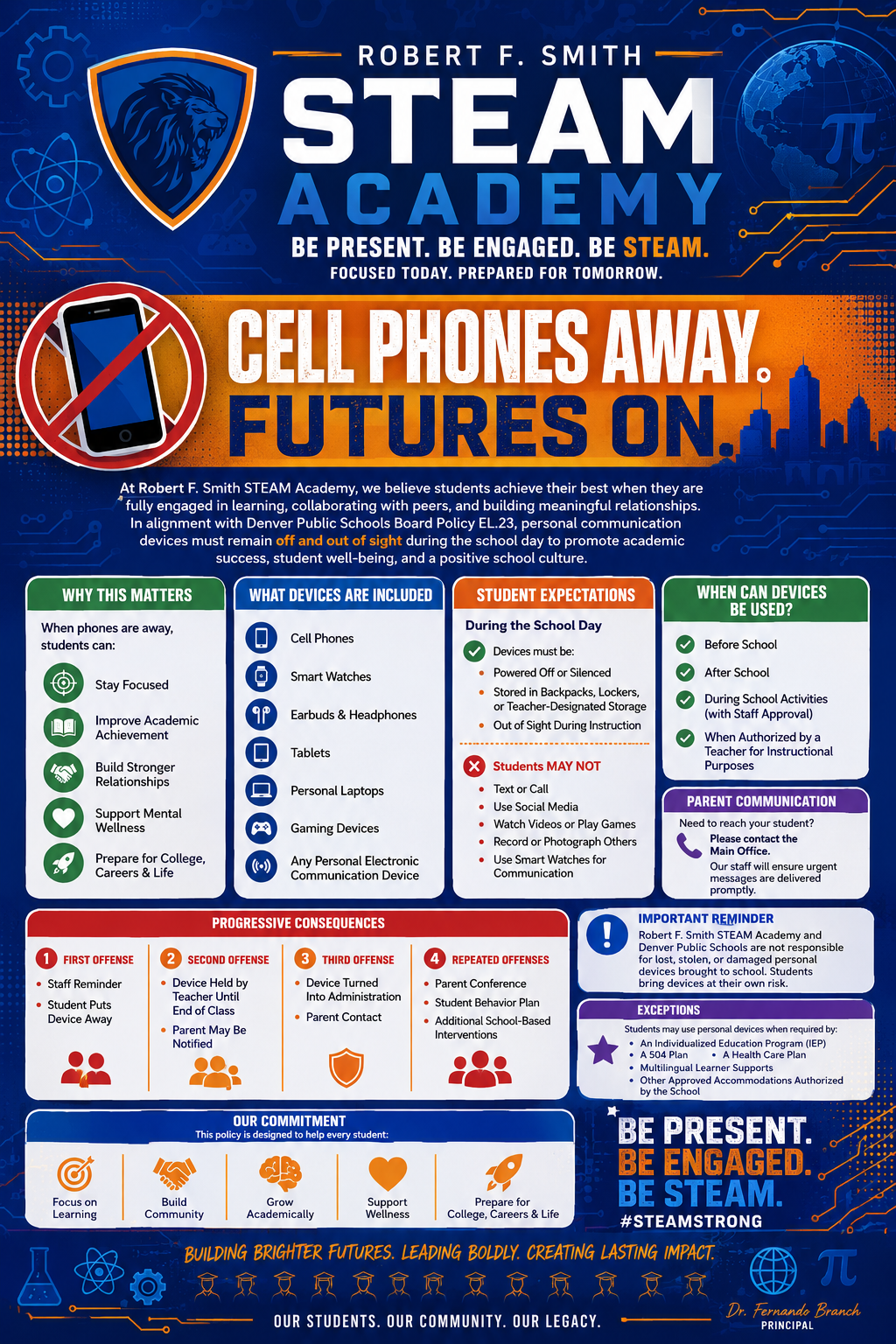
If a student chooses to bring their device to school, during the instructional school day, it must be turned off and kept out of sight. Students will receive school-specific storage instructions from their school teams at the beginning of the school year.
What is a “personal communication device?”
A personal communication device (PCD) is a privately-owned, portable electronic communication device. PCDs include, but are not limited to:
- Cellphones.
- Smart or electronic wearables (such as smart watches or smart glasses).
- Wireless earbuds and earphones.
- Personally owned tablets and laptops.
- Non-district-issued computing devices.
- Any other personally owned, portable electronic communication device.
When will the policy start?
The policy will start at the beginning of the 2026-27 school year.
Who does the policy apply to?
The policy applies to all district-run schools for all students in every grade (ECE-13). The policy does not apply to DPS charter schools.
When do PCDs need to be turned off and out of sight?
PCDs need to be turned off and out of sight while students are on campus during the instructional school day, including passing periods, restroom breaks, lunch and traveling from building to building. PCDs may be stored in bags, backpacks, lockers or cars. They may not be stored in pants pockets.
What is considered a violation of the policy?
If a PCD makes a sound, vibrates or is in plain view during the school day, the student who possesses it will be breaking district policy.
What happens if a student uses a PCD on campus during the school day?
When a student breaks the policy, a staff member will direct the student to turn off the device and put it away. If the student violates the policy more than once within the same school year, the school will follow the four steps from administrative policy JICJ.
- First violation: a staff member will direct them to turn off and put away the device. The student will be reminded of the reasons behind the policy and its expectations.
- Second violation: The PCD will be turned off and taken by a staff member to be stored securely, as determined by the school. The device is returned to the student at the end of the school day, and a guardian is told.
- Third violation: the PCD will be turned off, taken by a staff member and stored securely. The device will be returned only after a conference with the guardian, student and school staff member. They will review the policy and come up with a plan for the student to follow.
- Fourth violation: school administration will step in for accountability and support. It may include daily device check-in, the loss of the privilege to bring a PCD to school, searches, a behavioral contract, chances to reflect and other interventions.
A student who refuses to surrender a PCD upon the request of a teacher or other school official shall be subject to disciplinary action under the Student Code of Conduct, independent of the steps above.
Do PCDs need to be turned off and put away during field trips or overnight trips?
PCDs must be turned off and put away for field trips during the instructional school day. Since overnight trips are not during school hours, students may use their PCDs.
How can guardians and students communicate with each other during the school day?
Students will still be able to get in touch with parents, guardians, employers and others during the school day. Every school will provide a reliable way for families and students to send messages, usually by calling the main school office.
What happens if there is an emergency at the school?
Students will not be allowed to use their cellphones, smart watches and other PCDs during school emergencies. In these situations, using a PCD can put students and staff at risk, get in the way of police and emergency workers and spread false information. During a lockdown or active-threat emergency, the school and/or district will contact families with official updates as soon as they can and will share new information as soon as possible.
Students should follow regular safety procedures and keep their PCDs turned off. If they see something, they need to tell an adult or make a Safe2Tell report on their Chromebook or district-issued device.
How can guardians help their students?
A limit on PCDs will help students build the skills they need to use technology responsibly. Read A Parent’s Guide to Healthy Screen Time for Kids as an example of how guardians can work with their students to build healthy screen habits.
Why is a PCD policy important?
The Colorado legislature recently passed a bill called HB 25-1135. This law requires every school district in Colorado to create and enforce an official policy that is published on its website about how students can use personal communication devices during the school day.
At Denver Public Schools, we want to build schools where every student thrives. We are focusing on creating classrooms where learning is central, where engaging classes taught by caring teachers respect and celebrate every student.
We must create a school environment that supports students academically, socially and emotionally. This includes helping them build a healthy relationship with technology. By putting a limit on personal devices, we can make sure school is a place for learning and meaningful, face-to-face friendships. During an important time in our children’s lives, they must continue to learn how to interact with each other. This includes reading verbal and non-verbal cues during conversations and practicing critical thinking and problem solving skills. This decision to create the personal communication device policy comes from our desire to help students stay present and engaged throughout the school day.
Where is there more information?
View the DPS website at www.dpsk12.org/pcd for more information. If you have any questions, please contact the Family and Community Engagement (FACE) Helpline at 720-423-3054 or facehelpline@dpsk12.net.